Architecture III: The Client
Reminders
- Office hours: on Discord, or by appointment
- Discussion also on Discord: Join via Pawtograder
- DUE TONIGHT, Wed Sep 16: The Ticket Hunt
- DUE Thu Sep 17: Project Bids
- DUE Thu Sep 24: Onboarding: Gradebook Column Groups
The Ticket Hunt Closes Tonight, 23:59
Two tickets you file
GitHub issues on pawtograder/platform, labeled cs4535-hunt.
From two different roles. One is you as a student; the second is the role you claimed on Sep 10.
Steps a stranger can follow · expected vs. actual · where you saw it · who it affects · evidence · why it matters.
Search first. Duplicates are the most common way this goes wrong.
Two items you triage
Comments on somebody else's item. Axe findings in #910, a TODO in the tree, or an unlabeled issue.
One of three verdicts: still real (with a size), no longer real (with how you know), or undecidable (naming what you'd need and who has it).
The reasoning is what's assessed. "Still relevant" earns nothing.
It lands in two places. GitHub is where the work goes. The hunt form in Pawtograder is the record that you did it, and it closes at the same moment.
CS 4535: Software Design & Delivery
Architecture III: The Client
©2026 Jonathan Bell, CC-BY-SA
Learning Objectives
After this session, you'll be able to:
- Trace one value from a Postgres row to a rendered cell, and say how it updates without a reload
- Decide which layer a change belongs in: migration, RPC, controller, hook, or component
- Say what the gradebook's grouping is derived from today, what its interface is, and what your migration has to preserve
How Today Works
Every client application, in every language, answers three questions. Today is those three questions, and this codebase's answers:
1. Where does the data live while the user is looking at it?
2. How does the screen find out it changed?
3. What is recomputed, and what is stored?
Two working breaks, in pairs. No TypeScript required for either one, and none of today needs you to have written React.
Question 3 is the assignment due on the 24th.
There Is No Backend
app/course/[course_id]/layout.tsx, the server component every course page sits under, in full:
authenticate the user
resolve their role in this course, or redirect away
if they're a student, prefetch their rows so the first paint isn't empty
hand everything to client-side providers
108
lines in that file
430 / 637
components marked "use client"
2
files in the repo marked "use server"
Below that layout, the browser talks to Postgres.
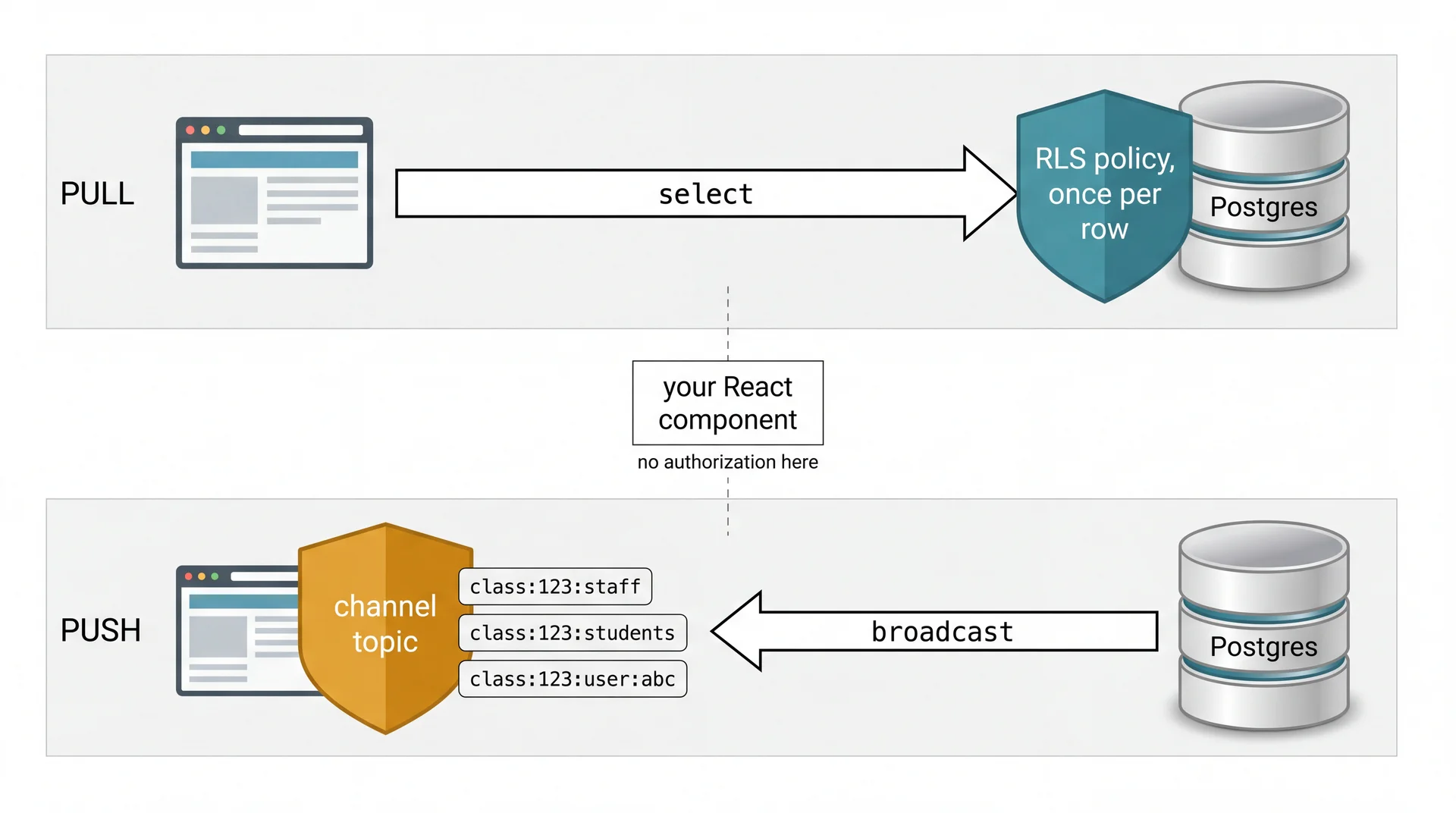
Two Gates, and Neither One Is In Your Component
Watch It Move
Two windows. Instructor gradebook on the left, the same course as a student on the right.
Change one score.
No reload. No polling. One websocket frame, and one cell repainted.
Discussion: Where Does This Change Go?
Six minutes, in pairs. For each request, pick a layer and name one consequence. No code.
LAYERS migration · RPC · controller · hook · component
- An instructor can rename a column group.
- The group header shows how many columns are in it.
- Students never see a group that hasn't been released.
- The gradebook shows a class average for each group.
One of these is not the layer it looks like.
You've Bound a Label to a Property Before
JavaFX, if you built the smart home app
brightnessValueLabel.textProperty().bind(
    light.brightnessProperty().asString("%d%%"));
Pawtograder, useGradebookColumn(id)
const [column, setColumn] = useState(
  controller.rows.find(c => c.id === id));

useEffect(() =>
  controller.getById(id, setColumn).unsubscribe,
  [id]);

return column;
Both say the same thing: bind once, never refresh by hand. The right-hand one writes out the unsubscribe, because nothing owns the lifetime for you.
A hook is a ViewModel. That's the whole idea.
The Gotcha You Already Met
ObservableList fires when items are added or removed, but not when a property inside an existing item changes.
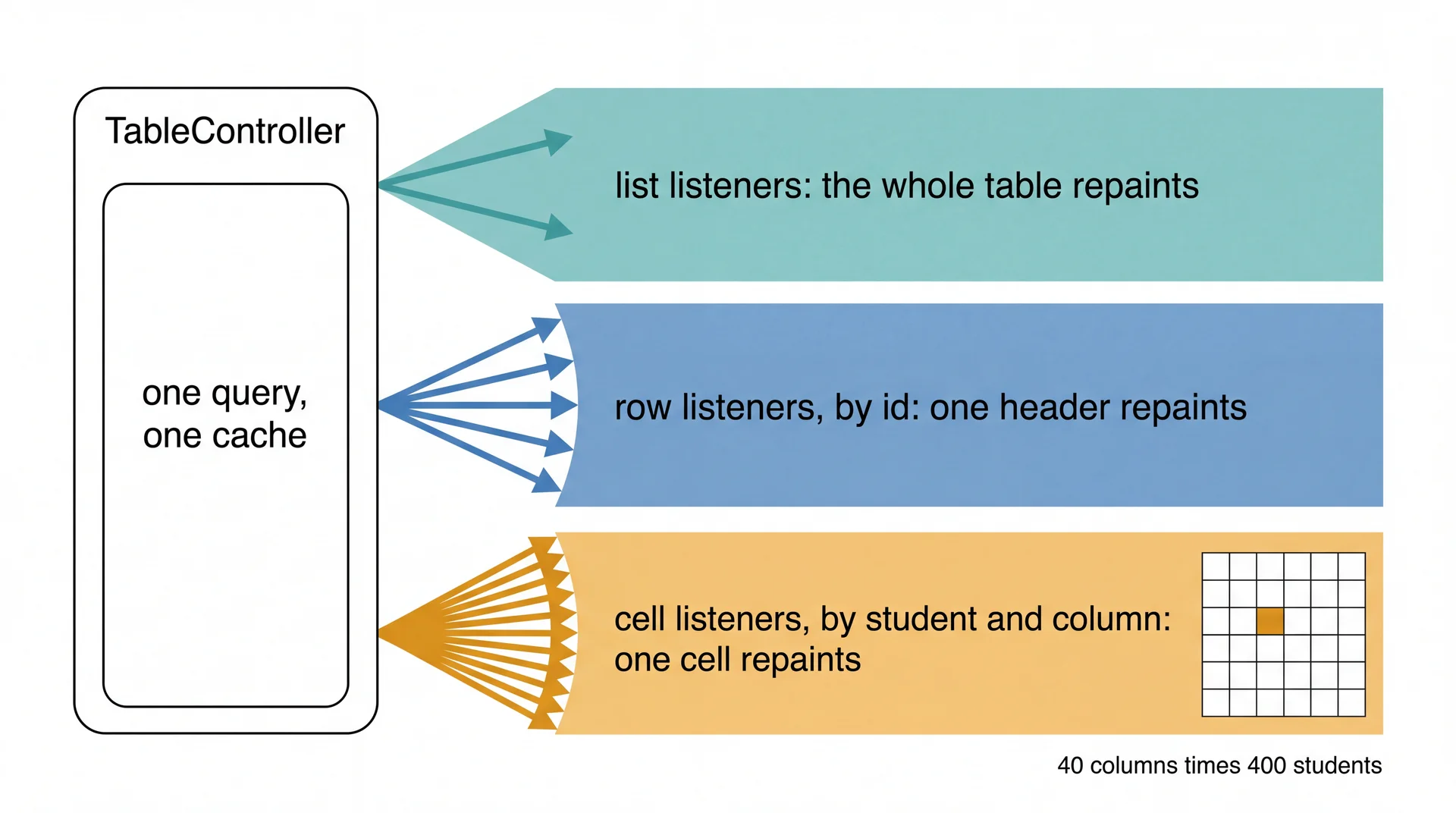
One Query Per Table, Per Course
get gradebookColumns() {
  if (!this._gradebookColumns) {
    this._gradebookColumns = new TableController({
      client: this.client,
      table: "gradebook_columns",
      query: this.client.from("gradebook_columns")
                        .select("*")
                        .eq("class_id", this.courseId),
      classRealTimeController: this.classRealTimeController,
      initialData: this._initialData?.gradebookColumns
    });
  }
  return this._gradebookColumns;
}
Built on first use. One query, scoped to one course. Every component on the page shares it.
The Schema Is the Contract
utils/supabase/SupabaseTypes.d.ts is 14,494 lines, and nobody wrote it.
npx supabase migration new add_column_groups   # write the SQL
npx supabase db reset                          # replay it from scratch
npm run client-local                           # regenerate the types
npm run seed -- --template cs4535              # db reset dropped your class
Skip the third command and you get type errors in files you never opened.
Eight Things You'll Meet In That File
Self-study. Enough to read gradebookTable.tsx without a React course.
useState(x) | a field that repaints its component when it changes |
useEffect(fn, [deps]) | run fn after render; re-run when deps change. Return a cleanup function |
useMemo(fn, [deps]) | cache fn's result until deps change |
<Thing prop={x} /> | construct Thing, passing x. Arguments, spelled like HTML |
{expr} in markup | evaluate expr and render it |
Foo<Bar> | a generic, same as Java |
a?.b | b, or undefined if a is null |
a ?? b | a, unless it's null, then b |
What the Memo Actually Does
gradebookTable.tsx, around line 2556. React removed; this is all of it.
for (const col of columns) {                      // sorted by sort_order
  const parts = col.slug.split("-");

  const base = (parts[0] === "assignment" && parts.length >= 3)
    ? parts[0] + "-" + parts[1]                   // assignment-lab, assignment-exam
    : parts[0] || "other";

  const contiguous = lastSortOrder === -1
    || col.sort_order === lastSortOrder + 1;      // no gap since the last one

  if (!contiguous || base !== currentGroupKey) {
    currentGroupKey = base;
    currentGroupIndex++;                          // start a new group here
  }

  groups[base + "-" + currentGroupIndex].columns.push(col);
  lastSortOrder = col.sort_order;
}
A group is a string prefix plus an unbroken run of integers. That is the entire concept.
The Memo Is Not the Interface
What sixty lines of slug-splitting produces:
Record<string, { groupName: string; columns: Column[] }>
groupedColumns is referenced 18 times in that file: the table headers, the virtualizer's height math, the collapse state, and the drag-to-reorder path.
Keep the shape. Change where it comes from.
Three Copies, Not Two
The same slug-splitting rule is written out in three places:
| Where | What it decides |
|---|---|
gradebookTable.tsx ~2556 | the instructor gradebook's headers |
whatIf.tsx ~543 | what students see in the what-if view |
gradebookTable.tsx ~229 | which block a drag moves |
And none of them exist in SQL. No report, export, or edge function can see a group at all.
Sketch It. No TypeScript.
Five minutes, in pairs. Get Monday's sketch out. Groups are rows now.
SHAPE    what does the thing the table reads look like?
         ............................................

OWNER    who sorts the groups, and who decides collapsed?
         ............................................

CHANGE   somebody renames a group in another browser.
         what happens in yours, and how?
         ............................................

KEEP     what must still be true for the other 17 callers?
         ............................................
Where Sketches Come Apart
The group key gets rebuilt on the client anyway, out of habit. If you have the row, you have the id.
Sorting drifts into the component. Group order is everyone's; collapsed is only yours.
CHANGE is blank. A rename in another browser has to arrive somehow, and you already watched it happen.
Key Takeaways
Where does the data live? In one controller per table per course, shared by every component, kept current by the database rather than by a refresh button.
How does the screen find out? A row changed, a topic carried it, one listener fired, one cell repainted. Authorization happened twice and neither time in your component.
Derived or stored? Today a column group is derived, three times, from a string nobody is allowed to edit. Next week you store it.
Keep the shape. Change where it comes from.
Up Next
Thu Sep 17: Reliably Releasing Software
You now know how a change reaches a browser. Tomorrow is how it reaches production without taking anything down: dark launches, safe migrations, and rollback as the first response rather than the last.
Before then:
- The Ticket Hunt, tonight 23:59. GitHub and the form
- Project Bids, due Thu Sep 17, 23:59
- Column Groups, due Thu Sep 24, 23:59. Eight days