Individual Project 3 Due Wednesday February 18, 2026 11:00am (EST)
In this third individual deliverable, you will be given some more freedom in how your features are developed and will
The objectives of this assignment are to:
- Investigate and understand a large, existing codebase
- Make changes that span the frontend and backend of a full-stack application
- Get experience with implementing features using the socket.io implementation of websocket
- (Optional) allow you a chance to get experience with working with large-language-model based tools for coding
In keeping with the last objective, you may use code generation (i.e. “AI”) tools in this assignment, with two caveats:
- You are responsible for every line of code in your final submission. If we ask you questions about your submitted code and you are unable to explain why decisions were made because you accepted the LLM’s suggestions without understanding them, you will receive a failing grade on this assignment.
- The PDF you hand in on Gradescope should document which LLM tools you used, how you used them, and whether you think the experience saved you time overall. (How much time did you spend on the assignment? How much time did the use of tools cost, or save? Did you go down any blind alleys or wild-goose chases due to your use of the tools you used?) This can be brief. Do not use text-generation to generate this text; your internal process of reflection and writing is the point.
Changelog
- 2026-02-08: Fixed typos in LLM discussion description.
- 2026-02-16: Correction: replaced “new games page” with “list-of-games page” in 1.4
- 2026-02-16: Clarification: replaced “the user first navigates” with “the user navigates”
- 2026-02-16: Clarification: replaced “Navigating to” with “Navigating to or otherwise refreshing” in 1.9
1. Getting Started
Start by accepting our GitHub Classroom Invitation. It will create a Github repository for you which will include the starter code for this assignment. Run npm install in the root directory to fetch all dependencies for the client, server, and shared folders.
2. Recommendations When Working on the Project
- Have the frontend and backend running, and have the project open in your browser, while you are working. It’s very useful to have the website update as you make changes.
- Frequently add and commit changes with git. This saves your changes and makes it easy to go back to a state where most tasks were complete, and is especially important when using tools that may be changing your code in unexpected ways.
- Do not wait until the last minute to run
npm run lintandnpm run checkto check for linter and typescript errors! - Follow the debugging policy to help in the debugging process.
3. Project Submission
You will submit your code by pushing the final version into your repository (add/commit/push). All commits must be visible on the main branch on GitHub classroom to receive credit. Be sure to check if the correct version is submitted before the deadline.
On Gradescope, you will submit a plain .pdf file containing three things:
- A link to your project’s GitHub repo (e.g.
https://github.com/neu-cs4530/ip3-robsimmons) - The short reflection on your (optional) use of LLM tools, as described in the project introduction
- A more specifically testable version of Condition of Satisfaction 2.5, which matches your implementation
Grades will be assigned on Gradescope and synced to the Canvas Gradebook.
TypeScript ESLint, Vitest, and Configuration Files
The GitHub project contains a number of configuration files you may not modify. The files package.json, .prettierrc, tsconfig.json, vitest.config.mjs, and vite.config.mjs are examples of configuration files, as is everything in the .github directory. If you change any of these files, take care to change them back; the list of changes in the feedback PR should not show any changes to these files. You also may not include eslint-disable commands to disable ESLint’s checks in your final submission.
The code you submit must pass GitHub’s automatic checks, which mostly just amount to the TypeScript typechecker, the ESLint linter, and the tests. You can run these yourself like this:
ip1-me $> npm run prettier
ip1-me $> npm run check
ip1-me $> npm run lint
ip1-me $> npm run test
When you push your code to GitHub, you can see the status icon for your most recent submission. It’s initially a yellow circle, like this:

After the tests run, this will turn into a red ❌ or a green ✅. Clicking on the icon will let you see details of the tests we ran.
The Actions tab on GitHub has the results of previous runs.

Up to 25% of your total grade on the assignment may be deducted for CI failures (5% for Prettier failures, 10% for TypeScript failures, and 10% for ESLint failures). In severe cases we may decline to grade your assignment entirely. Give yourself sufficient time to find and fix any errors. ESLint warnings do not cause CI to fail and will not automatically lead to a deduction, but it is bad practice to have lots of console statements in your code, and this can lead to a point deduction if it makes it hard for a TA to understand your code.
4. Implementation Tasks
The implementation tasks are framed in terms of user stories and conditions of satisfaction. These user stories are quite a bit more narrow, specific, and focused than the user stories we expect for the group project.
Task 1: A New Game Has Been Created!
User story: As someone who leaves Game Nite open in the background while I’m at work, I want to be able to see when new games are created, so that I can be one of the first to join or watch.
For this task, you will extend the websocket interface of Game Nite in order to alert users to the presence of new games.
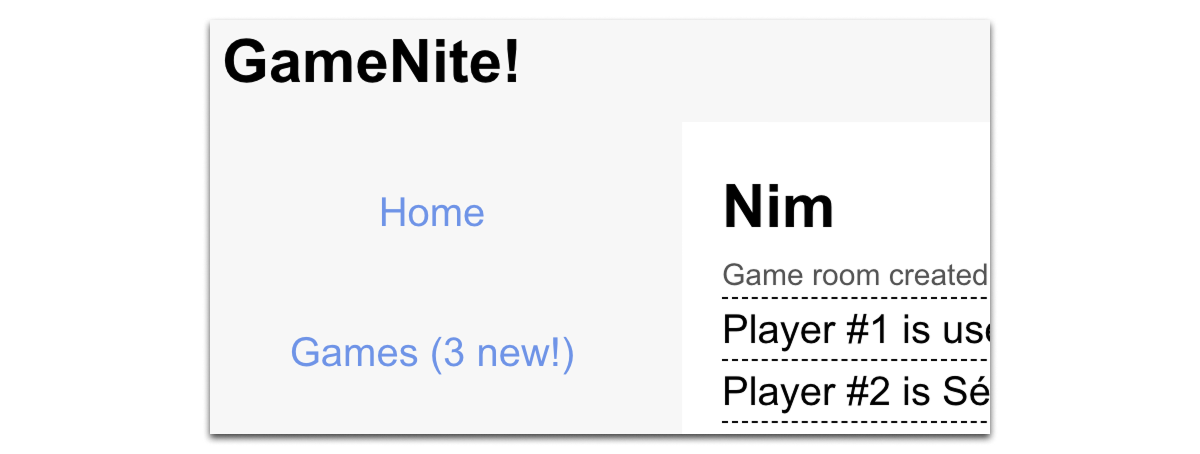
These essential conditions of satisfaction form the minimum viable product:
- 1.1: When a user creates a new game, any users watching the Game Nite home page will immediately see the new game inserted to the top of the list of games.
- 1.2: A new game appearing on the home page does not cause currently-visible games to be removed. This means that new games may cause more than four games to be visible on the home page.
- 1.3: When a user creates a new game, any users watching the “All games” page at
/gamessee the new game inserted. - 1.4: On both the home page and list-of-games page, new games that have been added since page load have some attention-getting designation as new games. (“New!”)
- 1.5: When the user navigates to the home page or new games page, there are no games with the attention-getting new-game decoration.
For full credit, you should also implement these desirable conditions of satisfaction:
- 1.6: Every browser session has a notional concept of “unviewed new games.” If this count is non-zero, the “Games” sidebar item includes the count, for example by reading “Games (2 new!)”
- 1.7: When a user starts a new game, their own count of unviewed new games does not increase.
- 1.8: When the user is on the home page or the “All games” page, the count always stays zero.
- 1.9: Navigating to or otherwise refreshing the home page or the “All games” page resets the count.
- 1.10: When a user is not on the home page or “All games” page and another user starts a game, the count of unviewed new games increases.
Here is a scenario describing how these desirable conditions work:
- User 1 and User 4 are playing a game of Nim. Their unviewed-new-game count is 0, so they see “Games” in the sidebar.
- User 2 logs in. The are on the home page, and their unviewed-new-game count is 0.
- User 3’s unviewed-new-game count is 0, and they start a new game of Number Guesser.
- User 1 and User 4 have an unviewed-new-game count of 1. They see “Games (1 new!)” in their sidebar. (CoS 1.10)
- User 2 has an unviewed-new-game count of 0 (CoS 1.8)
- User 3 has an unviewed-new-game count of 0 (CoS 1.7)
- User 4 visits the home page, which sets their unviewed-new-game count to 0. (CoS 1.9)
We will examine the style and quality of your code. For full credit, make sure:
- Any modified or introduced functions have appropriately updated JSDoc comments.
- You are using Socket.io and not polling to re-fetch the game list.
- All code uses appropriate code style.
- Excessive repetition in React is avoided by creating new hooks or new components.
(This is not intended to be an exhaustive list.)
Task 2: Reviewing Game Moves
User story: As someone who likes reviewing game strategy, I want to be look back on the individual moves made in an ongoing or completed Game Nite game, so that I can improve my own gameplay and learn how other peoples’ strategy differs.
For this task, you will change your backend in order to record a history of the moves played in a game, and display the record of moves in a human-readable way in the frontend.
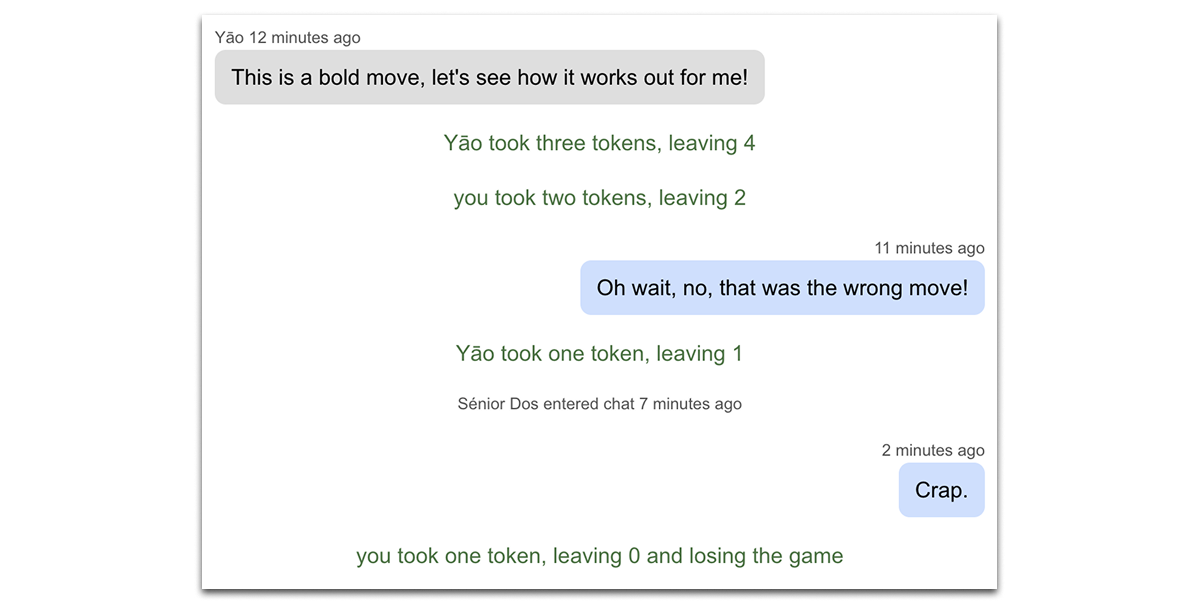
These essential conditions of satisfaction form the minimum viable product:
- 2.1: When a move is made, all users watching the chat see the same description of that move in the chat log.
- 2.2: Past descriptions of game moves appear interleaved in the chat window with chat messages and “(User) entered chat” messages.
- 2.3: Game moves are centered and styled in a way that emphasizes them more emphasis than “(User) entered chat” messages.
- 2.4: Descriptions of Nim moves have the form “(User) took {one token, two tokens, three tokens}, leaving N” or “(User) took {one token, two tokens, three tokens} and lost the game”, as appropriate, with (User) either being “you” or the display name of the user.
For full credit, you should also implement these desirable conditions of satisfaction:
- 2.5: Number Guesser also reports moves that make sense in the context of that game. (This is intentionally open-ended. You should include a more specific and testable version of this condition of satisfaction in the PDF you hand in on Gradescope.)
- 2.6: The description of past moves gets stored in memory: it’s possible to navigate away from a game page and then navigate back, and the log of all game moves will still be present.
We will examine the style and quality of your code. For full credit, make sure:
- Functions are added where appropriate and given good names and informative JSDoc comments.
- All code uses appropriate code style.
- The controller-service-repository pattern is respected: business logic is generally placed in the service layer, and the repository and controller don’t know about each other.
- The record types in
server/src/models.tsgive an indication of how the new data we are collecting is being stored. - The production of move descriptions is treated as a part of a game’s logic, and is added to the existing interface of games in a reasonable way.
(This is not intended to be an exhaustive list.)
Task 3: Testing
The starter code for this assignment includes Playwright end-to-end tests of login behavior and games. Pick a couple of your implemented conditions of satisfaction and create a new “end-to-end” test file that implements automated end-to-end tests of that new behavior.
Your code should be readable and make it clear what testable conditions you are describing and which conditions of satisfaction these testable conditions relate to. There does not need to be a one-to-one relationship between testable conditions and Playwright tests: a single Playwright test can cover multiple testable conditions, and a testable condition can be covered by multiple Playwright tests.
Make sure that this new file gets added to your Git repository and pushed to GitHub!
5. Grading Summary
The assignment as a whole is worth 100 points. Partial credit will be given for partial completion of MVP implementations and desirable tasks.
- Task 1: 45 points
- MVP implementation: 20 points
- Desirable tasks: 10 points
- Code quality: 15 points
- Task 2: 45 points
- MVP implementation: 20 points
- Desirable tasks: 10 points
- Code quality: 15 points
- Task 3 and reflection on AI usage: 10 points