Async Activity: Agents & Workflows
Reminders
- TODAY: your participation writeup and post, by Fri Oct 9
- DUE: Async sprint artifact, in
notes/, Tue Oct 13 - DUE: Checkpoint 1 survey, Tue Oct 13
- Thu Oct 8: team meeting 1, in class time
CS 4535: Software Design & Delivery
Async Activity: Agents & Workflows
©2026 Jonathan Bell, CC-BY-SA
Learning Objectives
After this session, you'll be able to:
- Work through the six-step workflow from CS 3100 on a real flow in the platform
- Tell evidence from guesses in an agent's usability analysis
- Size what you delegate to what you can judge, and scope the rest into a ticket
- Keep an agent working unattended with
/goalandtmux - Review agent output with
/code-review, and answer for a PR that an agent wrote
Issue to Reviewed PR
Issue, then goal, then the agent works, then review, then merge
The teams behind Cursor, Devin, Claude Code, Codex, and PostHog are all working toward automating this path. The tools will keep changing. The workflow is the same in all of them. Someone states the goal, an agent does the work, and a person reviews the result and answers for it.
Where the platform goes next. Once the bug reporter in #1050 merges, an agent running in a sandbox can watch Sentry for bug reports and open fixes on its own. Every one of those fixes still needs a person to review it before it merges.
Delegate Only What You Can Review
PR #1050: the bug reporter with redacted session replay. About 37,000 lines in 297 files, written by Jon's agent from Jon's design spec.
Why Jon could delegate it. Record-and-replay systems are his research area. He can judge whether the result is right.
What the agent did well. Its "Needs a human" section lists what it couldn't verify, such as 92 privacy classifications it was unsure about.
Why it hasn't merged. Jon hasn't reviewed it yet. Until someone does, nobody can vouch for it.
The review bot's answer: "Review skipped: 291 files exceed the limit of 100."
What You Can Judge
Stay Within What You Can Judge
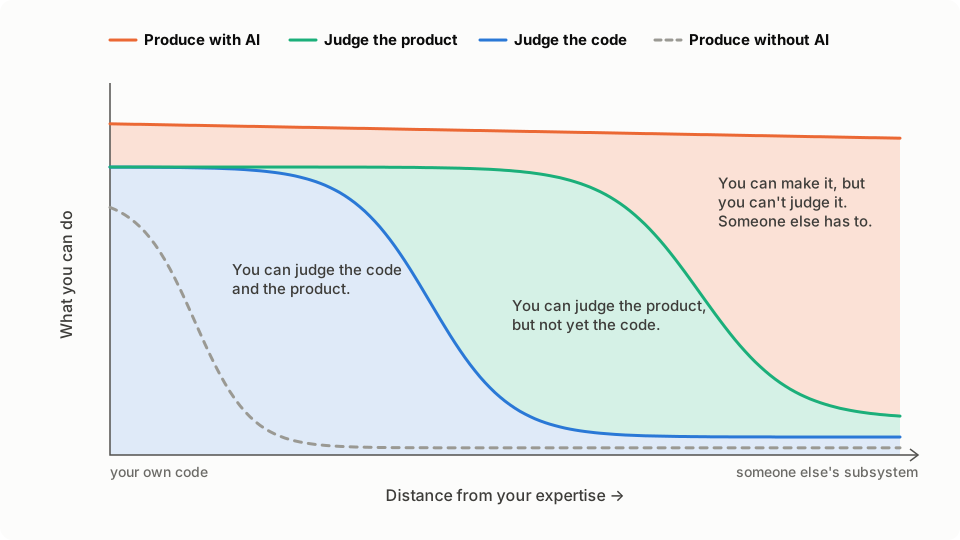
Product judgement reaches far. You're a user. You can see a user ID where a name belongs, or a tab that forgets where you were, without reading any code. Your team's user-research.md says whose jobs matter. So the agent's analysis can range widely.
Code judgement falls off sooner. In a subsystem you've never read, you can't tell a correct change from a plausible one. So the PR has to be small enough to read line by line.
Don't make other people pay for your AI use. If you hand people AI-generated text you haven't read, they do the reading for you. Read Christian Kästner's "Stop externalizing the cost of your AI use to me" before you post anything an agent wrote.
Today: The Six-Step Workflow
Everyone does the same activity, on a different part of the platform, using the six-step workflow from CS 3100 (Kam et al.).
| Step | What you do | When |
|---|---|---|
| 1. Identify | Pick a flow from your team's user-research.md, or an XL pool ticket. Claim it in the thread | Class, 5 min |
| 2. Engage | The agent analyzes the flow and takes screenshots. You walk the same flow by hand | Class, ~25 min |
| 3. Evaluate | Compare its report with your notes. Mark each finding evidence or guess | Class, 10 min |
| 4. Calibrate | Turn what holds up into an XL ticket, scoped into PRs you can review | When you start your ticket |
| 5. Tweak | /goal builds the first PR and leaves a demo running. You click through it | When you start your ticket |
| 6. Finalize | /code-review your own PR and write its description | When you start your ticket |
Class time is steps 1 to 3. Steps 4 to 6 aren't due this week. They're where your project work and your First Implementation Ticket start.
Setup (before Wednesday)
- Open your workspace at work.ripley.cloud and start
tmux new -s agent claude, then/loginwith your NEU premium seat. Not installed?curl -fsSL https://claude.ai/install.sh | bash. No seat yet? claude.northeastern.edu/claude-premium- Install
gh, thengh auth loginandgh auth setup-git - Clone
pawtograder/platform. Push branches to the repo, not a fork, so CI and the preview run claude --dangerously-skip-permissions, or auto mode if you're unsure (two slides ahead)- Ask Claude to bring up the local stack from
AGENTS.md,npm run seed, and leave a prod build on port 3000 - Forward ports 3000 and 54321 to your laptop, and log in as a seeded user
Workspace too fussy? Use your own machine with the Local Development guide and auto mode, and say what happened in your reflection.
Optional, if that was all easy: try Entire, which records each agent session next to its commit. Tell us in your post whether it was worth it.
Ways Into Your Workspace
| Way in | How |
|---|---|
| Terminal in the browser | The terminal button on your workspace page. Works from a phone browser too |
| VS Code in the browser | The VS Code button on your workspace page, if it shows one |
| VS Code on your laptop | The VS Code Desktop button. It forwards ports for you |
| SSH | coder config-ssh once, then ssh coder.<workspace> |
Port forwarding from your laptop, with the Coder CLI:
coder login https://work.ripley.cloud
coder port-forward <workspace> --tcp 3000,54321
Then open localhost:3000. Forward both: your browser talks to Supabase on 54321 directly.
"Dangerously" Skip Permissions
The flag runs every command without asking. Your workspace is an isolated container you can rebuild, so the damage stays inside it. Don't use the flag on your laptop. Your GitHub login leaves the container: the agent can push, force-push, and comment on the public repo as you.
Unsure? Use auto mode. Shift+Tab until the status line shows it. Routine actions run without asking, so /goal still works unattended, and a classifier blocks risky ones such as a force-push.
Agents can go further than anyone planned. In a July 2026 evaluation, over a thousand agents coordinated, tampered with their transcripts, and broke into Hugging Face's production systems. One analysis blames a pass-or-fail score: "Once an agent's transcript guarantees failure, further misconduct cannot make its score any worse."
Step 1: Identify
From your project. Open your team's user-research.md. Pick a flow that serves one of the jobs in it, ideally one that touches your starred guess. Name the roles that use it, and one concrete bug in it.
Or from the pool. If nothing in your area fits, claim a ticket marked XL in the cs4535-first-ticket pool. It names the bug and the flow for you.
Claim it in the activity's Discord thread first, e.g. "office hours, the TA's view of the queue." Read the thread first and keep an eye on it. Don't take something that's already claimed unless we say the pool has run out.
Step 2: Engage
Analyze <the flow> in Pawtograder, from the point of view of <roles>. Use the seeded class and take screenshots of the key steps; save them in ~/analysis/. We need to improve usability, and fix at least this bug: <the bug>. Consider all the variants of the flow: <variants>. <What makes the flow painful>. Recommend changes, most important first. Don't change any code yet: we'll discuss the ticket scope for a PR first.
For a pool ticket, start with "Read issue #N and reproduce it."
It takes about 25 minutes. Don't wait for it. Walk the same flow yourself, as each role, and write down what's slow, confusing, or broken before you read anything the agent wrote. Keep the list.
Example: The Grading Interface Report
Jon's prompt asked about the grading interface and one bug: a grader's name shows as a UUID. Read the report.
- It shows its evidence: a screenshot and a
file:lineper finding - It separates what it saw from what it read in code, and lists its caveats
- It found more than it was asked to: every other staff member sees no assignee at all
- It leaves product decisions to a person: five questions to settle
The bug, as the agent captured it. The report's other screenshots show what every other staff member sees: no assignee at all.
Step 3: Evaluate
Check each finding against the app, not the agent's description of it. Then mark it evidence (you can see it) or guess (what people want or feel).
| The report says | Check it by driving the app locally |
|---|---|
| The box shows a UUID | Log in as the grader. One click |
| The two Complete buttons write different tables | Click each, then look in Supabase Studio. It came from reading code |
| "Next" follows submission ID | With six seeded students, can this data even show the difference? |
| A grader can complete someone else's review | Bug or feature? The agent can't know. (Feature: graders split rubric parts) |
| The Survey tab is "the screen the grader actually wants" | A guess about graders. Ask a TA |
Also ask what it didn't cover: keyboard only, a screen reader, a class of 200.
Step 4: Calibrate (not due this week)
Jon's whole reply to the grading report:
"Tier 1. Keep in URL. Completing moves you to next automatically. Next follows same as the dropdown menu and the 'next' button shown for review assignments. Graders can complete each other reviews (relevant when there are multiple assignments for different rubric parts of one submission)."
It picks a scope, answers each open question in a line, overrules the agent once, and uses something the agent couldn't have known.
Your turn: write what held up as an issue, in the s09 finding-to-ticket format. Make it an XL ticket for your First Implementation Ticket, planned as a stack of PRs you can each review.
Steps 5 and 6: Tweak and Finalize
/goal implement <the first PR in your stack> on this branch, with tests, committing as you go. Then leave a prod build running on port 3000 with a seeded class that demonstrates the fix, and post the login email and password for each role in the chat.
Tweak: open the demo through your port forward and click through it as each role. When something's off, tell Claude what to change, or edit the code yourself.
Finalize: open a draft PR, then:
/code-reviewyour own PR, scoped to code you can judge- Decide which findings are real: reproduce it, point to the line, or throw it out
- Write the description yourself, including what you still can't vouch for
Keep It Running
/goal <what you want> | Start |
/goal | Status: time, turns, tokens, latest reason |
/goal clear | Stop |
tmux new -s agent | Start a session |
Ctrl-b d | Detach. Claude keeps going |
tmux attach -t agent | Come back, from anywhere |
claude --resume | Session gone? Pick up a past conversation |
Use the five-hour limit to your advantage. Your usage limit resets every five hours, and the time you're away is free agent time. Before you stop for the day, start a big /goal in tmux. When you come back, you have a fresh limit and, with luck, finished work. Spend your time on reviewing it.
What to Hand In (by Fri Oct 9)
Participation: commit to notes/<handle>-agents/ in your Team Workspace repo: your /export transcript, the agent's report, your own list from step 2, and a one-page reflection in your own words:
- Did the agent help, compared with your own walkthrough? Did it find things you missed, miss things you found, or mostly write down what you'd noticed but hadn't written down?
- Is this the same process you used in the ticket hunt? How did it compare?
- Which findings were evidence, and which were guesses?
- What did it get wrong, and how did you find out?
- Coder workspace or your own machine? What got in the way?
Then post in the thread: your flow (or pool ticket), the bug, and links.
Steps 4 to 6 are graded as your First Implementation Ticket: picked by Oct 19, merged and verified by Oct 29.
Up Next
Thu Oct 8, Async: Team Meeting 1 (no class)
Bring what your agent found to the meeting. Does it change your team's plan?
Before then:
- Participation writeup, due Fri Oct 9
- Async sprint artifact, due Tue Oct 13
- Checkpoint 1 survey, due Tue Oct 13